TrackingTime Desktop App – Your Go-To Time Tracking Solution

The TrackingTime desktop app for Mac and Windows is designed for professionals and teams who want a focused, distraction-free space to track work and boost productivity. With key features like AutoTrack, seamless task management, and daily summaries, the desktop app brings everything you need into one powerful tool. Here’s a walkthrough of how to get the most out of it:
TrackingTime Desktop App
Getting Started with the TrackingTime Desktop App
Welcome to TrackingTime’s powerful desktop experience — designed to make tracking your work effortless, accurate, and completely private. Whether you’re just beginning or are already a seasoned time‑tracking pro, our desktop app brings everything you need into one streamlined, distraction‑free workspace. You’ll install the app in a few clicks, sync across devices, and unlock intelligent insights that help you optimize every minute of your day.
Installing the Desktop App
Download the app from the TrackingTime website and follow the installation instructions for your operating system (Mac or Windows). Once installed, log in with your TrackingTime credentials or create a new account if you’re just getting started.
Your Dashboard: Focused and Functional
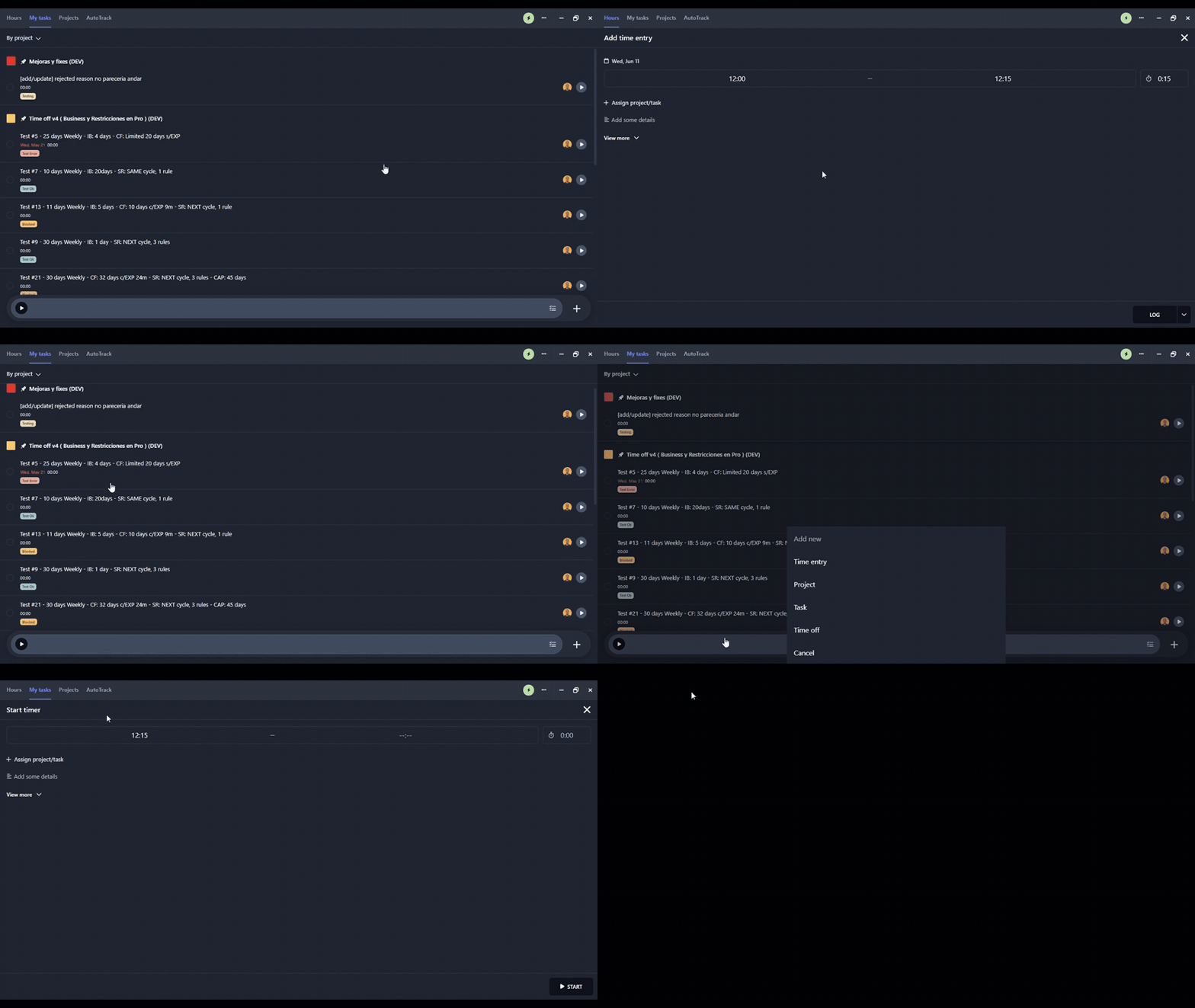
The dashboard is your home base for productivity. The Today View displays your ongoing tasks, total tracked hours, and activity timeline. You can easily start or stop timers, add time entries manually, and rearrange your day by dragging and dropping tasks. It’s designed to help you stay organized and focused on what matters most.
See Hours in Action: A Quick Video Walkthrough
Watch our short video on the Hours feature to see it in action. It’s a perfect complement to the Today View, showing you exactly how to manage, edit, and review your tracked time with precision. Whether you’re logging billable work or simply keeping tabs on productivity, this feature helps you stay in control, minute by minute.

Smart Time Tracking with AutoTrack
AutoTrack acts as your built-in productivity assistant by automatically logging app and website usage in the background—no manual input needed. This is especially useful for professionals who juggle multiple tasks or tools. Best of all, all activity logs are private and visible only to you. You can review your tracked activity at any time to precisely fill in time gaps. To enable AutoTrack, head to the settings menu and customize which apps or windows you want to monitor.

Create, Organize, and Manage Tasks
Creating and organizing tasks is intuitive within the app. By clicking “+ New Task,” you can quickly add new tasks and assign them to specific projects. Each task can be enhanced with due dates, time estimates, tags, and collaborators. You can also view tasks by project or sort them by date to keep everything streamlined.
Visualize Your Workday
The app’s visual timeline provides an at-a-glance view of how your day unfolds. You can see exactly what you’ve worked on, compare actual time worked to your scheduled hours, and identify any gaps, overlaps, or potential bottlenecks in your workflow. This visual feedback helps fine-tune your daily routines and improves time management.
Sync Across All Devices
Whether you’re at your desk or on the move, TrackingTime keeps everything in sync. All data is automatically synchronized with the web and mobile apps, allowing you to start a task on your desktop and finish it on your phone. Your updates, reports, and logs stay consistent and accessible across all platforms.
Reports and Insights
For deeper insights, use the in-app summary or access full reports via the web app. You can track billable hours, export timesheets, and analyze productivity trends for yourself or your team. This feature is especially useful for freelancers, agencies, and managers who rely on accurate time data for reporting and decision-making.
Why the TrackingTime Team Uses the Desktop App
Our team uses the desktop app daily as part of our workflow. Developers rely on AutoTrack to capture every detail of their work sessions. Designers appreciate the clean, focused interface that allows them to stay in the flow. Project managers depend on the timeline and dashboard views to oversee tasks and monitor project health. Whether you’re a solo user or part of a team, the desktop app provides clarity and control over your workday.
Start Tracking Smarter Today
Download the TrackingTime Desktop App now and unlock seamless, automatic time tracking that fits effortlessly into your workflow. With built‑in privacy safeguards and an intuitive interface, you’ll capture every minute accurately—no manual entry required. Say goodbye to incomplete timesheets and hello to precise, reliable data for yourself and your team. Plus, with powerful new features on the way, you’ll always stay ahead of your productivity goals.


